0

Shopping cart

There are currently no items in your shopping cart.

    34564
    34541
    Congratulations on your purchase and welcome to Philips Norelco!
    To fully benefit from the support that Philips Norelco offers, register your product at www.norelco.com/register.
    1. Click-on precision trimmer attachment
    2. Shaving unit with hair chamber
    3. Notification symbol
    4. Cleaning reminder
    5. Replacement reminder
    6. Travel lock symbol
    7. Battery charge indicator
    8. Battery charge percentage
    9. Personal comfort settings bar
    10. Personal comfort settings increase button
    11. Personal comfort settings decrease button
    12. On/off button
    13. Quick Clean Pod Cartridge
    14. Quick Clean Pod
    15. Small plug
    16. Power cord with plug
    17. Pouch
    Note: Remove any sticker or protective foil from the display before using the product.
    Charging
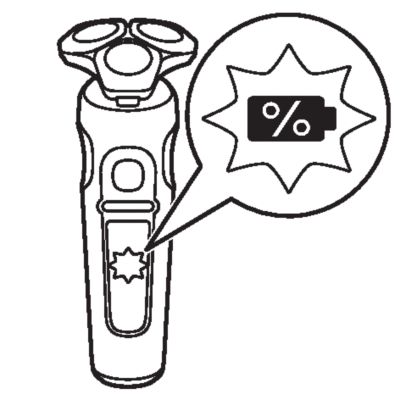
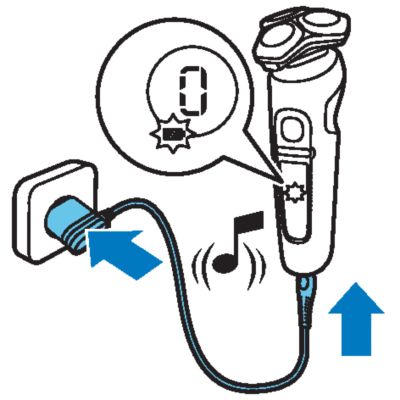
    When the shaver is charging, the battery charge indicator on the shaver flashes white.
    The battery charge is indicated by the battery charge percentage flashing on the display, which is shown when the shaver is moved.
    Quick charge: After approx. 5 minutes charging, the shaver contains enough energy for one shave.
    Battery fully charged
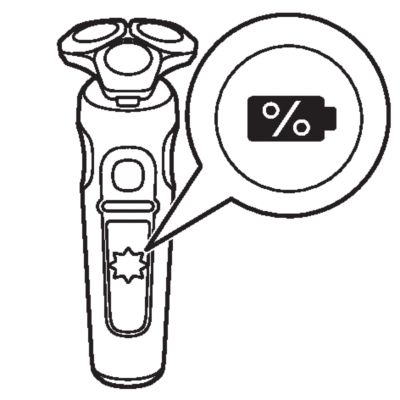
    When the battery is fully charged, the battery charge indicator lights up white continuously.
    Note: When the battery is full, the display switches off automatically after 15 minutes.
    The battery charge percentage lights up white continuously when the shaver is moved.\n
    Battery low
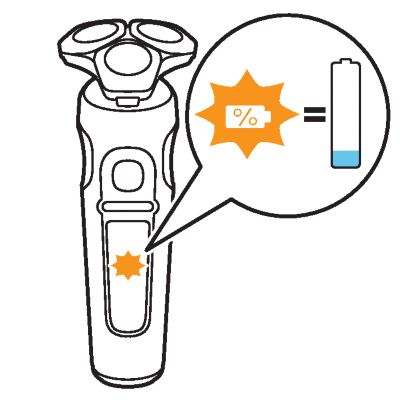
    When the battery is almost empty, the battery charge indicator flashes orange and the shaver beeps. At this point there is enough energy left for one shave.
    Remaining battery capacity
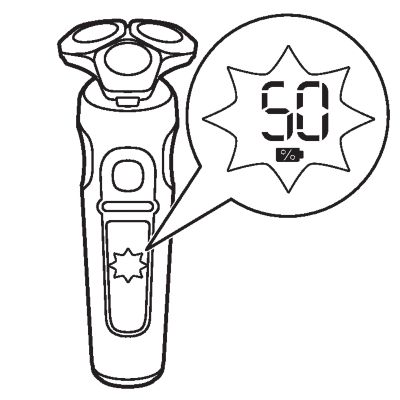
    The remaining battery charge is indicated by the battery charge percentage shown on the display.
    Personal settings
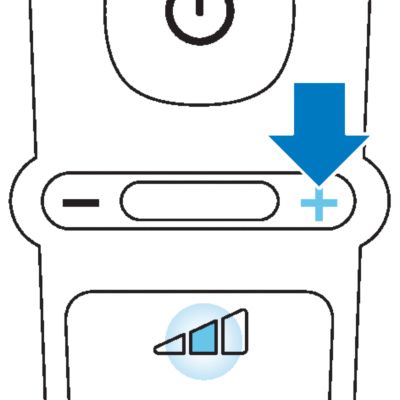
    The shaver has a feature that allows you to personalize your settings. Depending on your personal shaving needs, choose between three settings, from low to high: comfort, dynamic or efficiency. When you press the button on the left or right of the display, the segment of the personal comfort settings bar lights up to indicate the selected setting. To select a lower or higher setting, press the button on the left or right of the display.
    Cleaning reminder
    36152
    Clean the shaver after every use for optimal performance. When you switch off the shaver, the cleaning reminder flashes to remind you to clean the shaver.
    Travel lock
    When you are going to travel, you can lock the shaver to prevent it from accidentally switching on.
    Replacing shaving heads
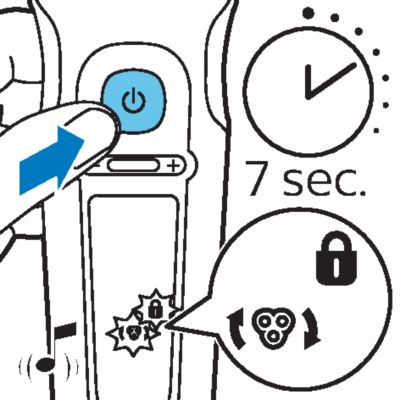
    For maximum shaving performance, we advise you to replace the shaving heads once a year. Replace damaged shaving heads immediately. Always replace the shaving heads with original Philips shaving heads.The shaver is equipped with a replacement reminder which reminds you to replace the shaving heads. The shaver beeps, the replacement reminder lights up and the arrows flash to indicate that you have to replace the shaving heads.Note: After replacing the shaving heads, you can reset the replacement reminder by pressing the on/off button for 7 seconds. If you do not reset the replacement reminder, the shaver resets automatically after 9 shaves.
    ’Unplug for use’ reminder
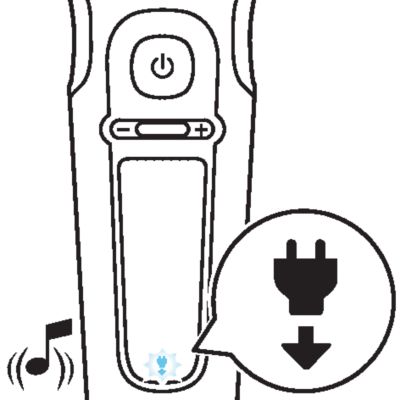
    The ‘unplug for use’ symbol flashes to remind you to disconnect the shaver from the wall socket before you can switch it on.
    Notification symbol
    Overheating
    Blocked shaving heads
    Charge the shaver before you use it for the first time and when the display indicates that the battery is almost empty.
    Charging takes approx. 1 hour. A fully charged shaver has a shaving time of up to 60 minutes.
    After approx. 5 minutes of charging the shaver contains enough power for one shave.
    Note: You cannot use the shaver while it is charging.
    Quick charge (18min) SP9xxx
    After approx. 5 minutes of charging the shaver contains enough power for one shave.
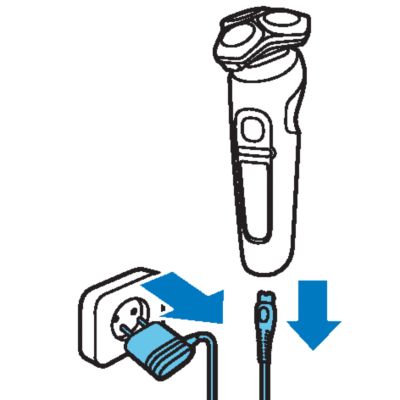
    Charging with the supply unit
    1. Make sure the shaver is switched off.
    2. Put the small plug in the shaver and put the supply unit in the wall socket. The display of the shaver indicates that the shaver is charging.

    3. After charging, remove the supply unit from the wall socket and pull the small plug out of the shaver.
    4. Note: When the battery is full, the display switches off automatically after 15 minutes.\n
    Always check the shaver and all accessories before use. Do not use the shaver or any accessory if it is damaged, as this may cause injury. Always replace a damaged part with one of the original type.
    This symbol indicates that the shaver can be used in the bath or shower.
    • Use this shaver for its intended household use as described in this manual.
    • For hygienic reasons, the shaver should only be used by one person.
    • Trimming is easier when the skin and hair are dry.
    Note: This shaver is waterproof. It is suitable for use in the bath or shower and for cleaning under the tap. For safety reasons, the shaver can only be used without cord.
    Switching the appliance on and off
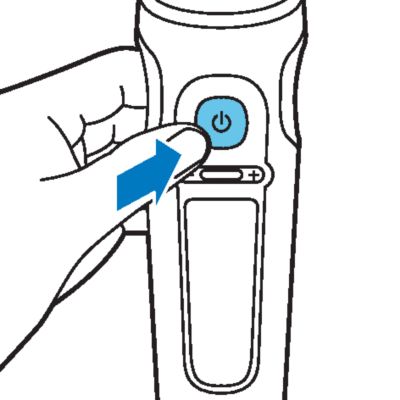
    1. To switch on the shaver, press the on/off button once. The battery charge percentage lights up for a few seconds.

    2. To switch off the shaver, press the on/off button once. The battery charge percentage lights up for a few seconds and shows the remaining battery charge.

    Shaving
    Skin adaptation period
    Shaving tips
    • For the best results on skin comfort, pre-trim your beard if you have not shaved for 3 days or longer.
    • Select your personal comfort setting.
    Dry shaving
    1. Switch on the shaver.
    2. Move the shaving heads over your skin in circular movements to catch all hairs growing in different directions. Make sure each shaving head is fully in contact with the skin. Exert gentle pressure for a close, comfortable shave.
    3. Note: Do not press too hard, as this can cause skin irritation.
    4. Switch off and clean the shaver after each use. The display lights up for a few seconds to show the remaining battery charge.

    Wet shaving
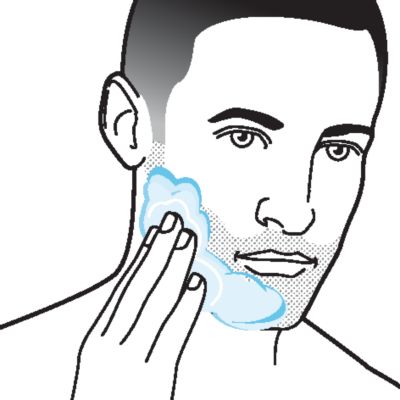
    1. Apply some water to your skin.
    2. Apply shaving foam or shaving gel to your skin.
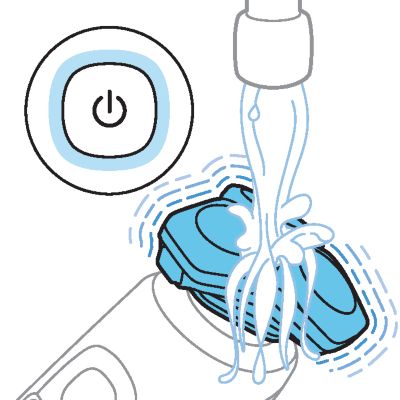
    3. Rinse the shaving unit under the tap to ensure that the shaving unit glides smoothly over your skin.
    4. Switch on the shaver.
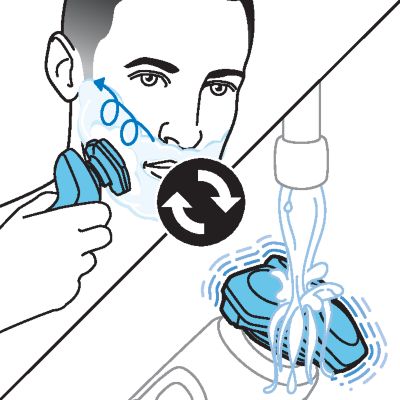
    5. Move the shaving heads over your skin in circular movements to catch all hairs growing in different directions. Make sure each shaving head is fully in contact with the skin. Exert gentle pressure for a close, comfortable shave.
    6. Note: Do not press too hard, as this can cause skin irritation.
    7. Note: Rinse the shaving unit regularly to ensure that it continues to glide smoothly over your skin.
    8. Dry your face.
    9. Switch off the shaver and clean it after each use.
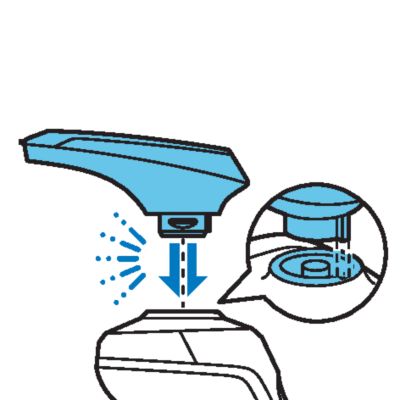
    Removing or attaching the click-on attachments
    1. Make sure the shaver is switched off.
    2. Pull the attachment straight off the shaver.
    3. Note: Do not twist the attachment while you pull it off the shaver.
    4. Insert the lug of the attachment into the slot in the top of the shaver. Then press down the attachment to attach it to the shaver (‘click’).
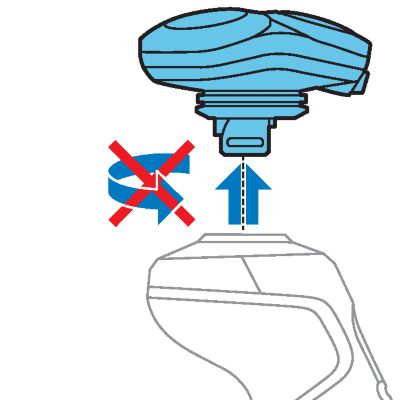
    Using the trimmer attachment
    You can use the precision trimmer attachment to touch up your beard, sideburns and moustache.
    1. Attach the attachment to the appliance (‘click’).
    2. Switch on the shaver.
    3. Hold the precision trimmer perpendicular to the skin and move it downwards while exerting gentle pressure.
    4. Switch off the shaver and clean the attachment after use.
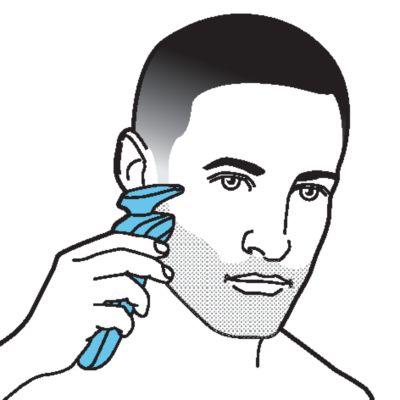
    You can lock the shaver when you are going to travel to prevent it from switching on accidentally.
    Activating the travel lock
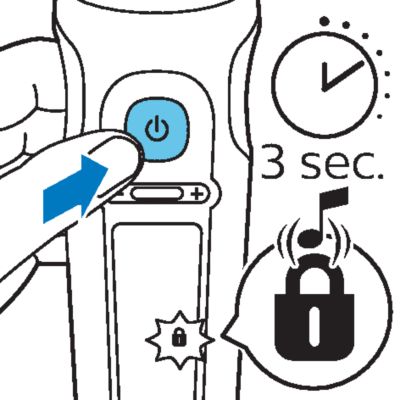
    1. Press the on/off button for 3 seconds to use the travel lock mode.
    2.  While you activate the travel lock, the travel lock symbol lights up briefly and the shaver produces a short sound.When the travel lock is activated, the travel lock symbol flashes. If you try to switch on the shaver while the travel lock is active, the travel lock symbol flashes.

    Deactivating the travel lock
    1. Press the on/off button for 3 seconds.
    2.  While you deactivate the travel lock, the travel lock symbol lights up briefly and the shaver produces a short sound.The shaver switches on and is now ready for use again.

    Regular cleaning guarantees better shaving results.
    Never clean, remove or replace the shaving unit while the shaver is switched on.
    Do not apply pressure to shaving head guards.
    Do not touch shaving heads with hard objects as this may dent or damage the precision-made slotted guards.
    Do not use compressed air, abrasives, scourers or aggressive liquids such as petrol or acetone to clean the shaver.
    Cleaning the shaver with the Quick Clean Pod
    What does the icon on my Quick Clean Pod mean?
    Icon
    Behavior
    Meaning
    Becomes visible on the Quick Clean Pod
    The Quick Clean Pod Cartridge needs to be replaced.
    Preparing the Quick Clean Pod for use
    1. Twist and remove the top of the Quick Clean Pod.
    2. Twist the lid off of the Quick Clean Pod Cartridge.
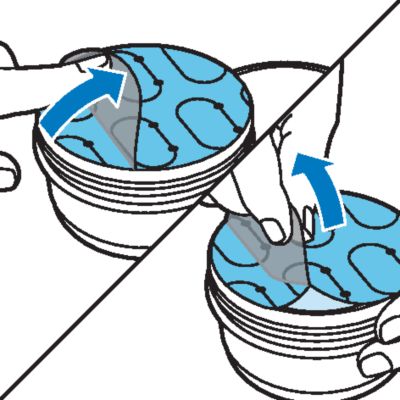
    3. Lift the tab on the seal and pull it by the corner to remove the seal from the Quick Clean Pod Cartridge.
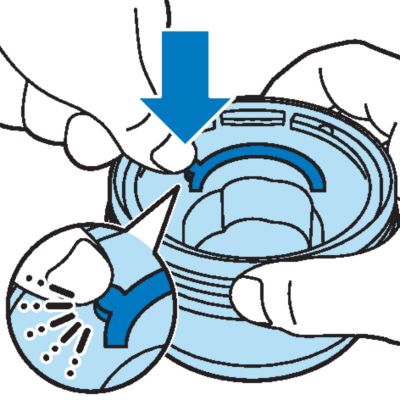
    4. Press the small circular piece on the handle of the Quick Clean Pod Cartridge to break the snap hook on the handle.
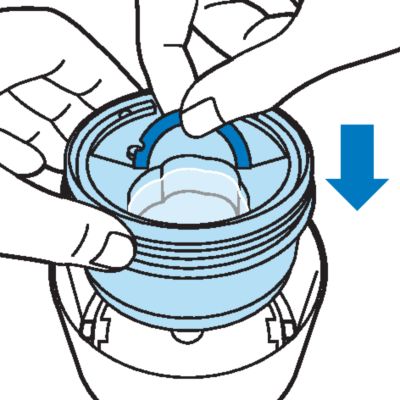
    5. Place the Quick Clean Pod Cartridge into the Quick Clean Pod.
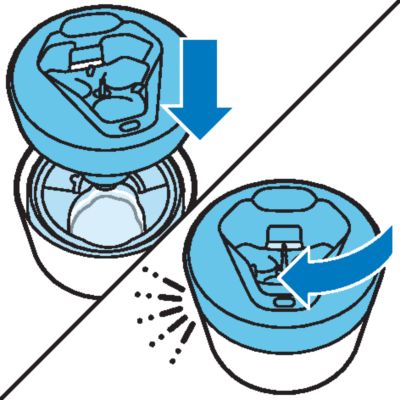
    6. Put the top of the Quick Clean Pod back onto the base and turn it clockwise until you hear a click.
    7. Do not tilt the Quick Clean Pod to prevent leakage.
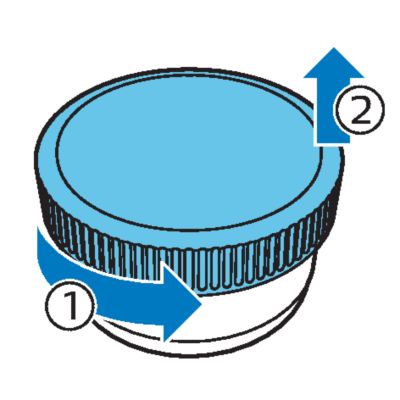
    Using the Quick Clean Pod
    1. Place the shaver upside down into the Quick Clean Pod. The shaver automatically detects that it is in the Quick Clean Pod.
    2. Switch on the shaver to start the cleaning program.
    1. Let the shaver air-dry completely in the Quick Clean Pod before storing it.
    Replacing the Quick Clean Pod Cartridge
    Frequency of use
    Cycles
    When to replace the Quick Clean Pod Cartridge
    Every day
    About 30
    Every month
    A few times per week
    About 20
    Every 2 months
    Every week
    About 13
    Every 3 months
    Every month
    About 3
    Every 3 months
    1. Twist and remove the top of the Quick Clean Pod.
    2. Lift the Quick Clean Pod Cartridge out of the Quick Clean Pod by the handle.
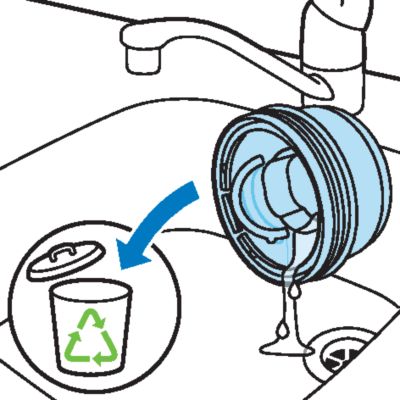
    3. Pour any remaining fluid down a drain and recycle the empty cartridge in accordance with local waste regulations.
    4. Place a new Quick Clean Pod Cartridge into the Quick Clean Pod. Scan the QR code to the left or visit www.philips.com/cleaning-cartridge to order replacement Quick Clean Pod Cartridges.
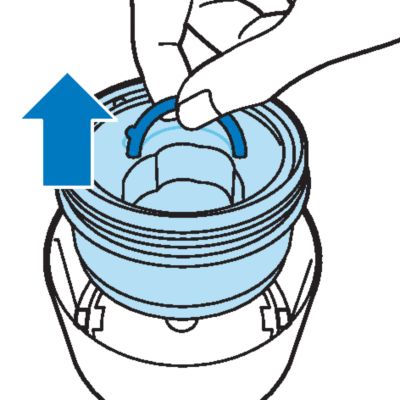
    Replacing the shaving heads_simple
    We advise you to clean the shaving heads thoroughly once a month or when the shaver does not shave as well as it used to.
    1. Switch off the shaver.
    2. Pull the shaving head holder off the bottom part of the shaving unit.
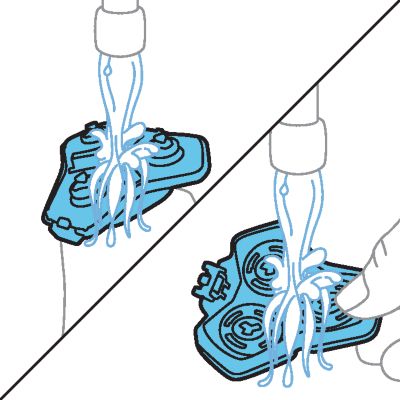
    3. Rinse the hair chamber and shaving head holder under the tap.
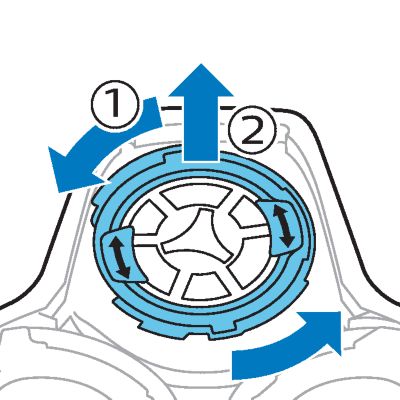
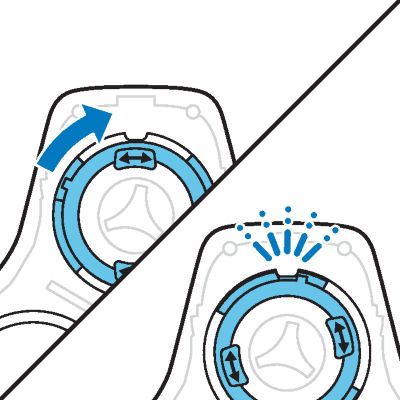
    4. Turn the retaining ring anticlockwise and lift it off the shaving head. Repeat this process for the other retaining rings. Place them aside in a safe place.

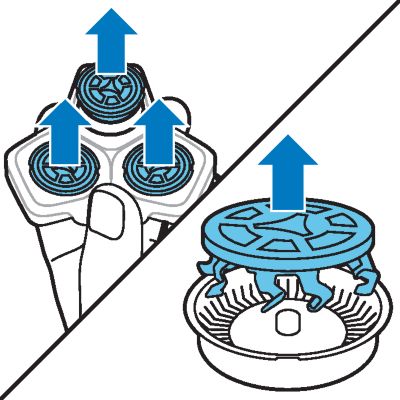
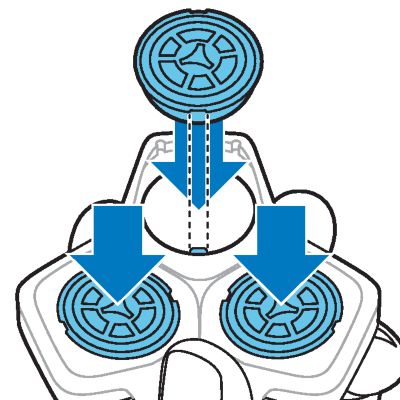
    5. Remove the shaving heads from the shaving head holder. Each shaving head consists of a cutter and guard.
    6. Note: Do not clean more than one cutter and guard at a time, since they are all matching sets. If you accidentally put a cutter in the wrong shaving guard, it may take several weeks before optimal shaving performance is restored.
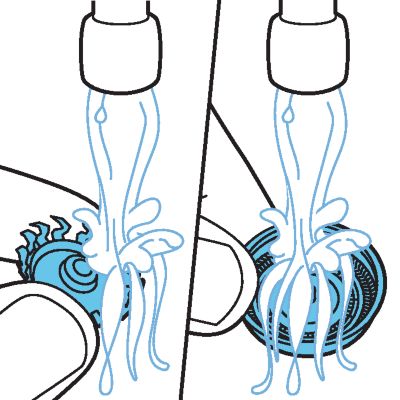
    7. Clean the cutter and guard under the tap.
    8. Shake off excess water.
    9. Put the cutter back into the guard.
    10. Place the shaving heads in the shaving head holder.
    11. Place the retaining ring on the shaving head.
    12. Align the arrows on the retaining ring with the projections in the shaving head holder. Turn the ring clockwise until it clicks to indicate that the ring is fixed.
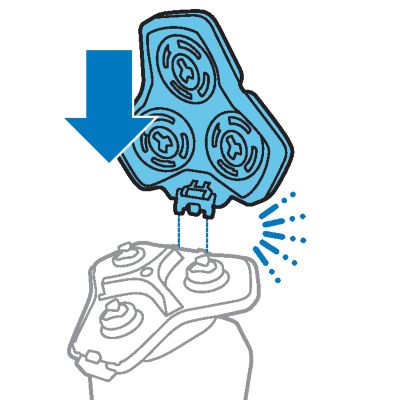
    13. Attach the shaving head holder to the bottom part of the shaving unit (‘click’).
    Cleaning the trimmer attachment
    Never dry the trimmer with a towel or tissue, as this may damage the trimming teeth.
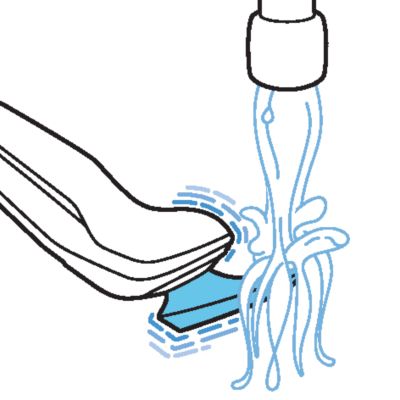
    Clean the precision trimmer attachment after each use.
    1. Switch on the shaver with the precision trimmer attachment attached.
    2. Rinse the attachment under a warm tap.
    3. After cleaning, switch off the shaver.
    4. Carefully shake off excess water and let the attachment air-dry completely.
    5. Tip: For optimal performance, lubricate the teeth of the attachment with a drop of sewing machine oil regularly.
    Replacing the shaving heads_simple
    For maximum shaving performance, we advise you to replace the shaving heads every twelve months. Replace damaged shaving heads immediately.
    Always replace the shaving heads with original Philips shaving heads.
    Replacement reminder
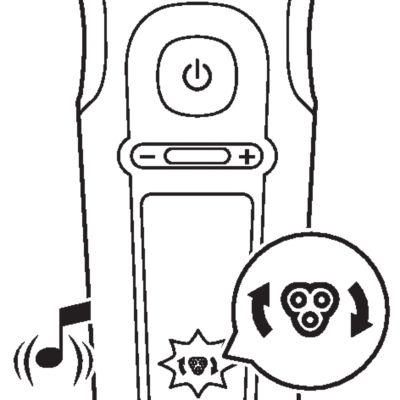
    The replacement reminder indicates that the shaving heads need to be replaced. The shaving unit symbol lights up continuously, the arrows flash white and you hear a beep when you switch the shaver on or off.
    1. Switch off the shaver.
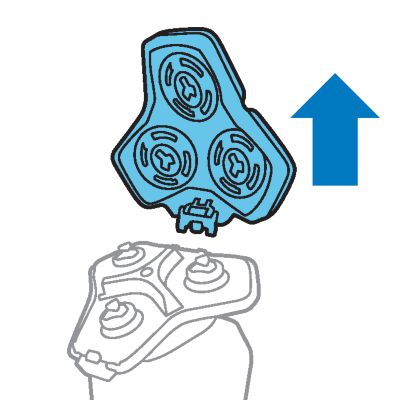
    2. Press the release button on the shaving unit and pull the shaving head holder off the shaving unit.
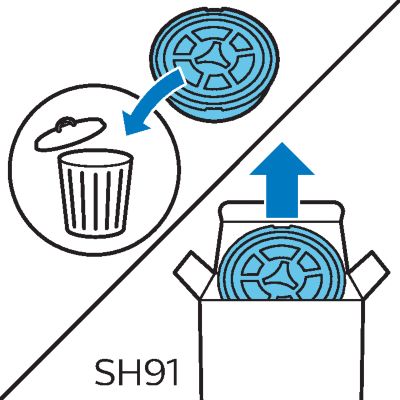
    3. Remove the shaving heads from the shaving head holder. Discard the used shaving heads immediately to avoid mixing them with the new shaving heads.
    4. After replacing the shaving heads, you can reset the replacement reminder by pressing the on/off button for 7 seconds. Wait until your hear 3 beeps.
      If you do not reset the replacement reminder, the shaver resets automatically after 9 shaves.
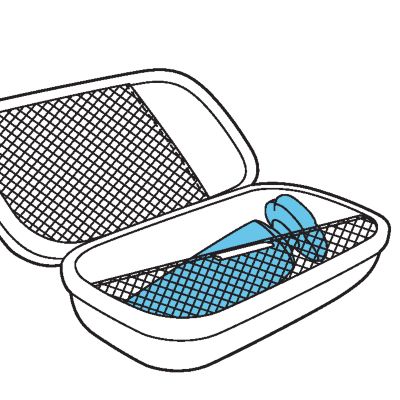
    Store the shaver in the pouch.
    Note: Always let the shaver dry completely before you store it in the pouch.
    To buy accessories or spare parts, visit www.philips.com/parts-and-accessories or go to your Philips dealer. You can also contact the Philips Consumer Care Center in your country (see the international warranty leaflet for contact details).
    The following accessories and spare parts are available:
    • SH91 Philips Norelco replacement shaving heads
    • CC12 Philips Norelco Quick Clean Pod Cartridge 2-pack
    For assistance, visit our website: www.philips.com/support or call toll free 1-800-243-3050.
    • This product contains a rechargeable lithium-ion battery which must be disposed of properly.
    • Contact your local town or city officials for battery disposal information. You can also call 1-800-822-8837 or visit www.call2recycle.org for battery drop-off locations.
    • For assistance, visit our website www.philips.com/support or call 1-800-243-3050 toll free.
    • Your product is designed and manufactured with high quality materials and components, which can be recycled and reused. For recycling information, please contact your local waste management facilities or visit www.recycle.philips.com.
    Philips North America LLC warrants this new product (except cutters and combs) against defects in materials or workmanship for a period of two years from the date of purchase, and agrees to repair or replace any defective product without charge.
    IMPORTANT: This warranty does not cover damage resulting from accident, misuse or abuse, lack of reasonable care, the affixing of any attachment not provided with the product or loss of parts or subjecting the product to any but the specified voltage or batteries.*
    NO RESPONSIBILITY IS ASSUMED FOR ANY SPECIAL, INCIDENTAL OR CONSEQUENTIAL DAMAGES.
    In order to obtain warranty service, simply go to www.philips.com/support for assistance. It is suggested that for your protection you return shipments of product by insured mail, insurance prepaid. Damage occurring during shipment is not covered by this warranty.
    NOTE: No other warranty, written or oral, is authorized by Philips Personal Health, a division of Philips North America LLC.
    This warranty gives you specific legal rights, and you may also have other rights which vary from state to state. Some states do not allow the exclusion or limitation of incidental or consequential damages, so the above exclusion and limitations may not apply to you.
    *Read enclosed instructions carefully.
    To enjoy the closest and most comfortable shave from your new Philips Norelco Men’s Shaver, the shaver should be used exclusively for 3 weeks. This allows your hair and skin enough time to adapt to the Philips Norelco Shaving System. If, after that period of time, you are not fully satisfied with your Philips Norelco Men’s Shaver, send the product back along with dated sales receipt and we’ll refund you the full purchase price.
    The product must be shipped prepaid by insured mail, insurance prepaid, have the original sales receipt, indicating purchase price and date of purchase.
    We cannot be responsible for lost mail.
    The product must be postmarked no later than 45 days after the date of purchase. Philips reserves the right to verify the purchase price of the product and limit refunds not to exceed suggested retail price.
    To obtain money-back guarantee service, please go to www.PhilipsMoneyBack.com.
    Delivery of refund check will occur 6–8 weeks after receipt of returned product.

    Our site can best be viewed with the latest version of Microsoft Edge, Google Chrome or Firefox.